
STUDENT SURVEY
Paid online surveys between students and get quality data with affordable prices, respondents will get reward
Problem And Solution
NEED DATA SURVEY
Have you been a student conducting a survey? Sometimes for coursework, thesis, research or to participate in the competition. We believe you are confused to get the respondent with the appropriate amount of standard and most of the results of the survey data is not in conformity or according to the criteria you want.
REWARD
When filling the survey, surely you feel lazy and bored. Based on the data from Green Book about “The reason of respondents who do not want to participate in the research ” There are 36.6% of respondents just want to participate in filling out surveys because of the rewards given by the surveys. Most existing surveys are still not appreciated by all respondents.
OUR SOLUTION
Student Survey is a paid online survey among students, where you can get quality data with affordable price. If you want additional income, you can be a respondent by filling out the existing surveys and earning rewards.
OUR DESIGN PROCESS
We are using design thinking methodology to craft our product. It’ll consist of four steps,
from empathize, ideation, design, evaluation

This stage is a condition of seeing people’s problems around us. By interacting, it will make us know what they are thinking and feeling. So you will know what they need. That way you can dig your mind to be able to answer anything they say to you when interacting

This stage is the stage for pouring out all the ideas you get in the previous step. The idea that appears at this stage can be a material to create a startup prototype and be tested to the user

This stage is the stage for pouring out all the ideas you get in the previous step. The idea that appears at this stage can be a material to create a startup prototype and be tested to the user

This stage is the stage for pouring out all the ideas you get in the previous step. The idea that appears at this stage can be a material to create a startup prototype and be tested to the user
EMPHATIZE
Persona
Representations of your target customers. Creating user personas involves researching and outlining your ideal customer’s goals, pain points, behaviour, and demographic information. Here are the 2 personas from our interviews.


Previous
Next


Previous
Next
Empathy map
A tool used to find customers ‘ demographic characters and develop a better understanding of the environment, behavior, and aspirations. Contains the respresentation of the users and stakeholders used in the form of maps. We make 2 empathy map, which are students as surveyors and students as respondents
HOW MIGHT WE QUESTION
A short questions that launch brainstorms. How Might We’s fall out of your point-of-view statement or design principles as seeds for your ideation.
Insight: Respondents wanted a reward in every survey undertaken
How might we: how to create a system that can reward any survey to all the respondents?
Insights: A specific survey topic
How might we: how can a system segment survey topics based on the appropriate user?
Insight: Surveyor needs to validate for each respondent’s response
How might we: how do data in validation by the surveyors?
Insight: supported the presence of mixed results graphs
How might we: how can the system create and display diverse results graphs?
IDEATION
User Journey
Describes a series of events or scenarios that users will experience when interacting with a particular product or service. Here we divide the application goals into 4 main goals, as below:


Previous
Next
User Flow
Used for user flow description when using the app.

Information Architecture
Art describes a model or concept of information used in activities that require explicit detail of a complex system. Here we use the Close Card Sorting method with 11 participants to define into the 5 corresponding categories of 29 cards.


Mental Model
Contains user needs when obtaining survey data and filling out surveys. There are also solutions offered by the application
DESIGN
SKETCH
In sketching we use paper so that it is cost-effective and faster to visualize. The sketch is used as a rough design of the application’s appearance and user experience process. Here are some sketches that we made


Previous
Next







Previous
Next
WIREFRAME
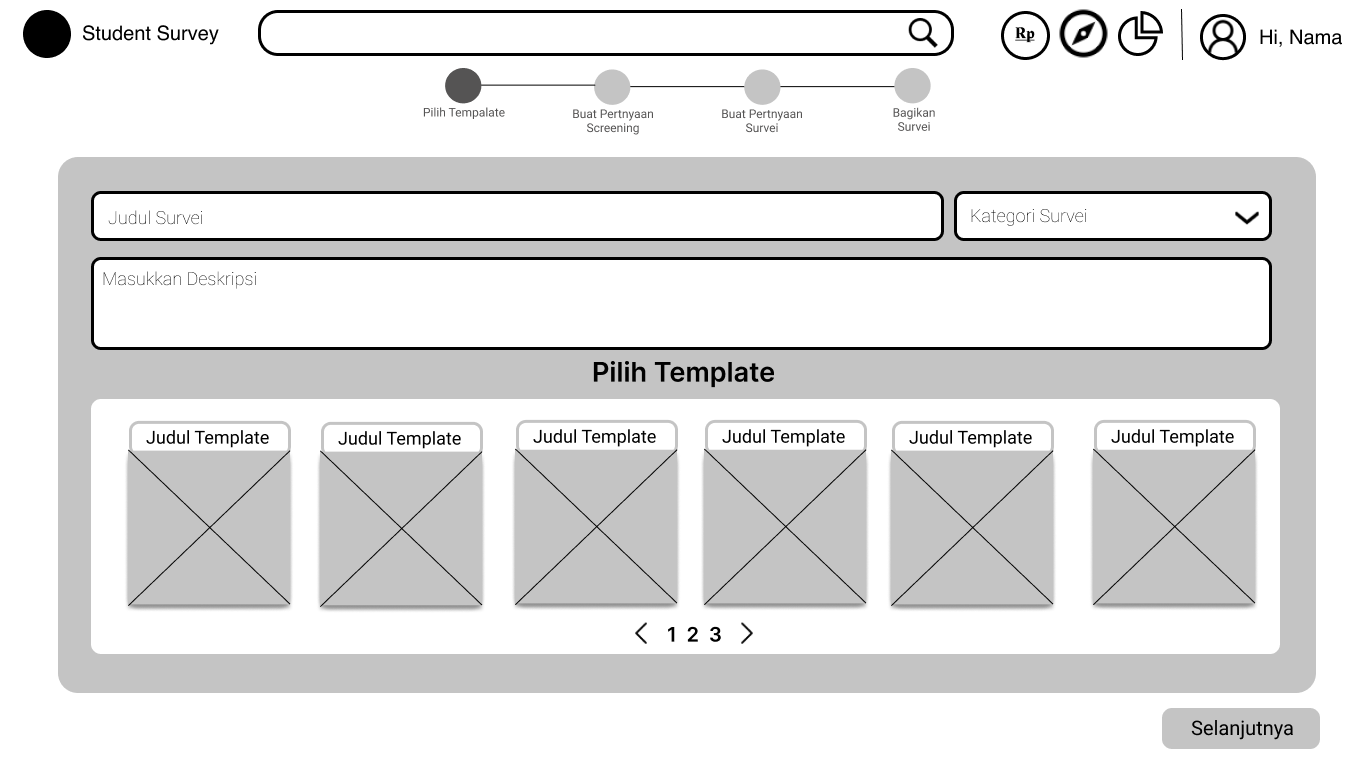
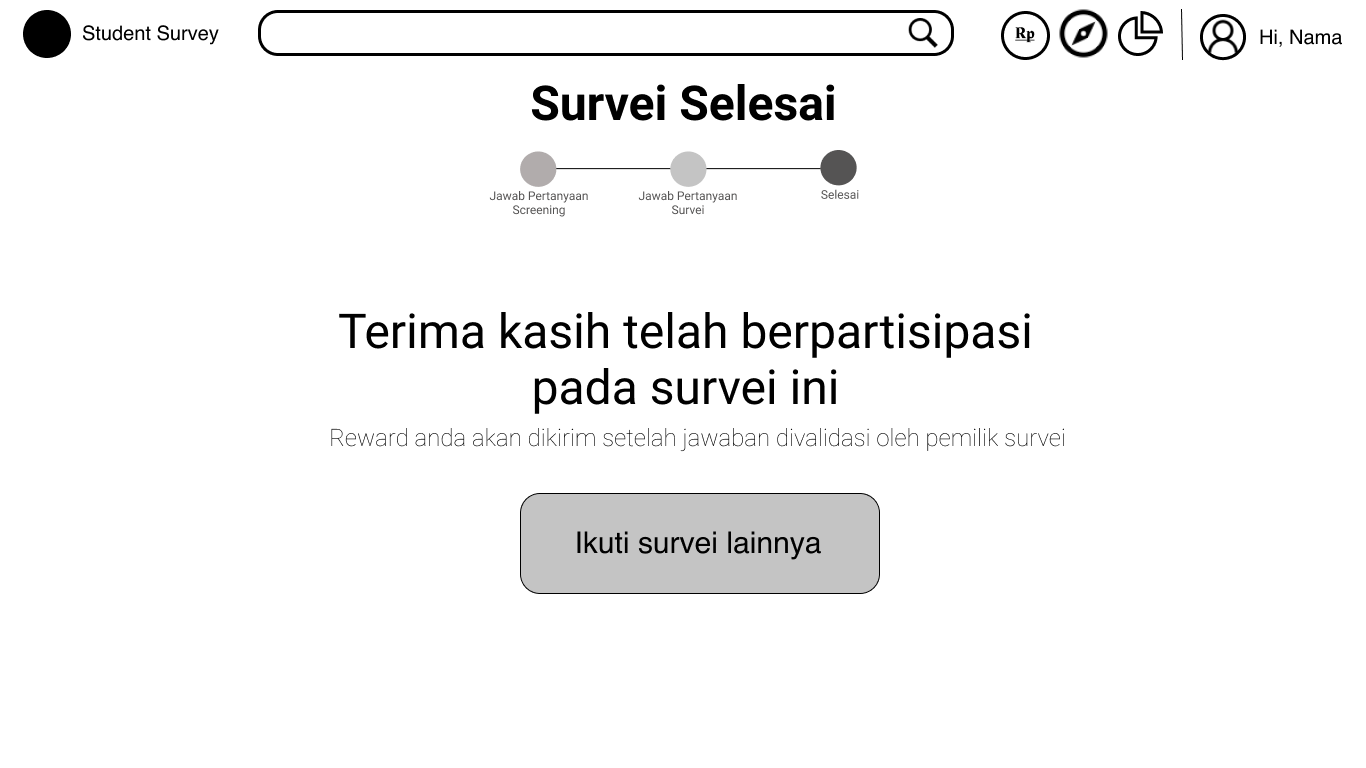
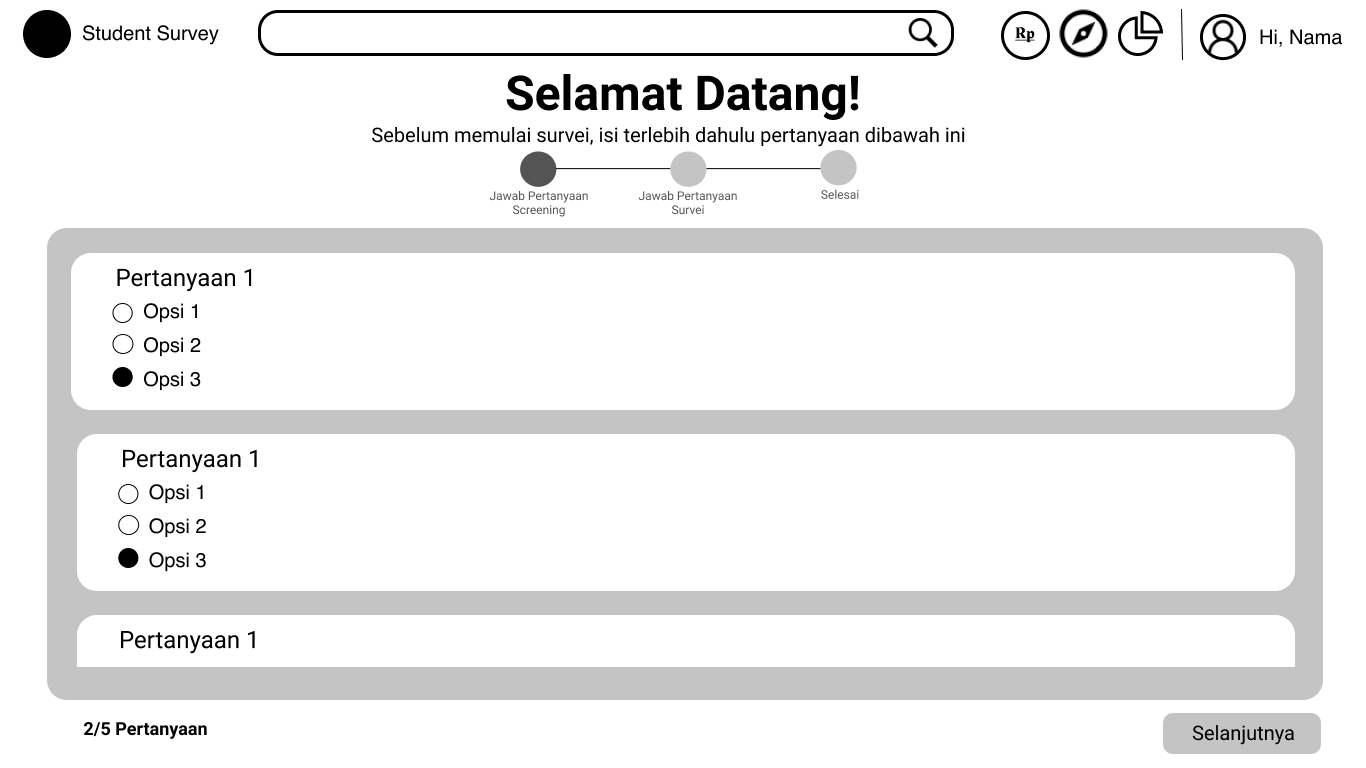
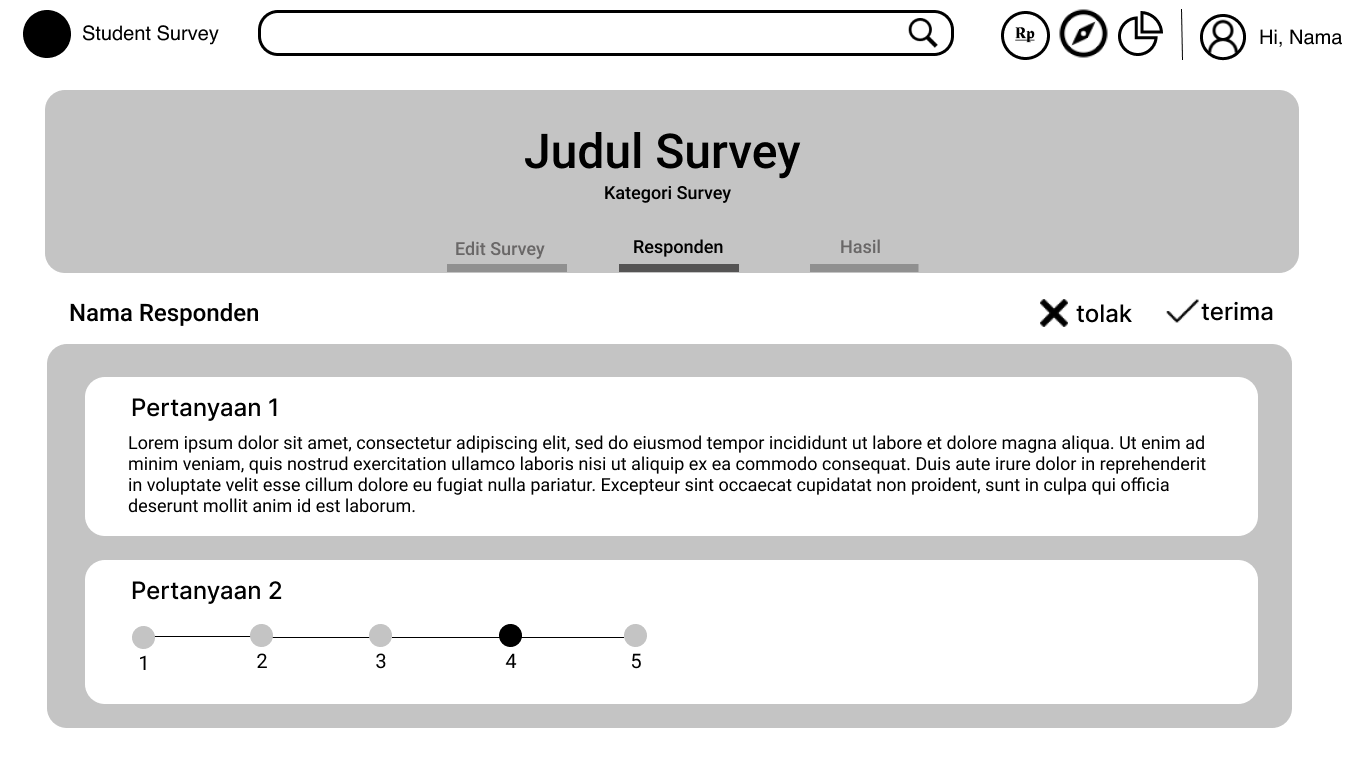
This wireframe is created to help convey the composition, structure, layout, navigation of content. Wireframe is made of black and white because it emphasizes content more than visual design. We make wireframes using figma to make it easy to collaborate
WIREFLOW
After creating a wireframe, an application flow can be made which can be called a screenflow which describes the user flow in using the application. In the screenflow will be described the user’s movement from the beginning to achieve a desired goal


Previous
Next
UI COMPONENT
Before creating an interface, first define the components used in the application. making components to create a consistent design


Evaluation

HEURISTIC EVALUATION
We do heuristic analysis to find and identify existing usability problems on products based on existing heuristics, and the outputs are in the form of severity points, which can help us understand the lack of usability of our products at more specific points.
SAVERiTY POINT
After doing a heuristic check then we analyze it using a severity point, the analysis results are also accompanied by recommendations for improvement
Poin Severity : 1,75 atau Permasalahan Minor
Beberapa pengguna tidak dapat membedakan ikon/element yang di klik dengan ikon/elemen lain karena ada highlight ikon yang tidak terlihat. Hal ini menyebabkan kemungkinan pengguna tidak dapat mengenali page yang sedang ia kunjungi.
Rekomendasi :
Penggunaan warna highlight pada ikon/elemen yang di klik menggunakan warnayang lebih terlihat oleh pengguna.
Match Between System And Real World
Poin Severity : 1 atau Permasalahan Cosmetic
Pada bagian ini tidak terdapat permasalahan yang serius, hanya pada beberapa halaman menggunakan bahasa tidak sesuai dengan tata bahasa karena target pasar yang dituju adalah mahasiswa sehingga menggunakan tata bahasa yang lebihfleksibel
Rekomendasi : Pemilihan tata bahasa pada semua halaman lebih konsisten menggunakan bahasayang fleksibel untuk menyasar target pasar yang dituju.
Poin Severity : 3,5 atau Permasalahan Catastrophic
Pengguna kesulitan untuk kembali kehalaman sebelumnya karena tidak di
sediakanya tombol kembali, meskipun telah disediakan tombol kembali dari browser namun tidak adanya tombol kembali yang disediakan dalam aplikasi menjadi permasalahan yang serius dan perlu diperbaiki sebelum aplikasi dirilis. Pada aplikasi juga belum terdapat fungsi undo/memundurkan langkah menyebabkan pengguna harus menghapus dan mengisi.membuat ulang pertanyaan/jawaban survei.
Rekomendasi :
Disediakannya tombol kembali untuk ke halaman sebelumnya. Juga dibuatkannyafungsi undo pada halaman membuat survei dan mengisi survei.
Poin Severity : 1,5 atau Permasalahan Minor
Pada aplikasi menggunakan banyak Ikon, karena memang pada bagian mengisi dan membuat survei memerlukan ikon untuk merepresentasikan tools yang disediakan.
Rekomendasi :
Pada setiap ikon diberi label nama.
Help Users Recognize, Diagnose, and Recover From Errors
Poin Severity : 1,25 atau Permasalahan Cosmetic
Pada detail error message tidak disediakan pembeda antara pengguna yang baru dengan yang sudah berpengalaman.
Rekomendasi :
Memberikan learning guideline pada pengguna baru untuk mempelajari
fungsionalitas aplikasi secara umum.
Poin Severity : 2,75 atau Permasalahan Mayor
Belum adanya peringatan kepada pengguna saat pengguna melakukan pengambilan langkah yang kesalahan dan berpotensi memberi resiko error yang serius.
Rekomendasi :
Memberikan peringatan kepada pengguna berupa dialog pop up yang isinya berupapilihan ya atau tidak saat mengambil langkah yang berisiko.
Poin Severity : 1,25 atau Permasalahan Cosmetic
Pada beberapa penempatan error yang tidak terlihat oleh pengguna hal ini
menyebabkan pengguna tidak menyadari adanya error
Rekomendasi : penempatan error diletakkan pada bagian yang mungkin dapatterlihat oleh pengguna
Flexibility Aesthetic, And Minimalist Design
Poin Severity : 0,75 atau Permasalahan Cosmetic
Pada form masuk/login menggunakan dialog input yang dirasa kurang sesuai dengan konvensi yang ada
Rekomendasi : Penggunaan dialog form input ditiadakan dan membuat halamanbaru untuk form masuk/login
Visibility Of System State
Match Between System and Real World
User Control And Freedom
Consistency And Standards
Help Users Recognize, Diagnose, and Recover From Errors
Error Preventions
Recognition Rather Than Recall
Flexibility Aesthetic , And Minimalist Design
Prototype
HI FIDELITY
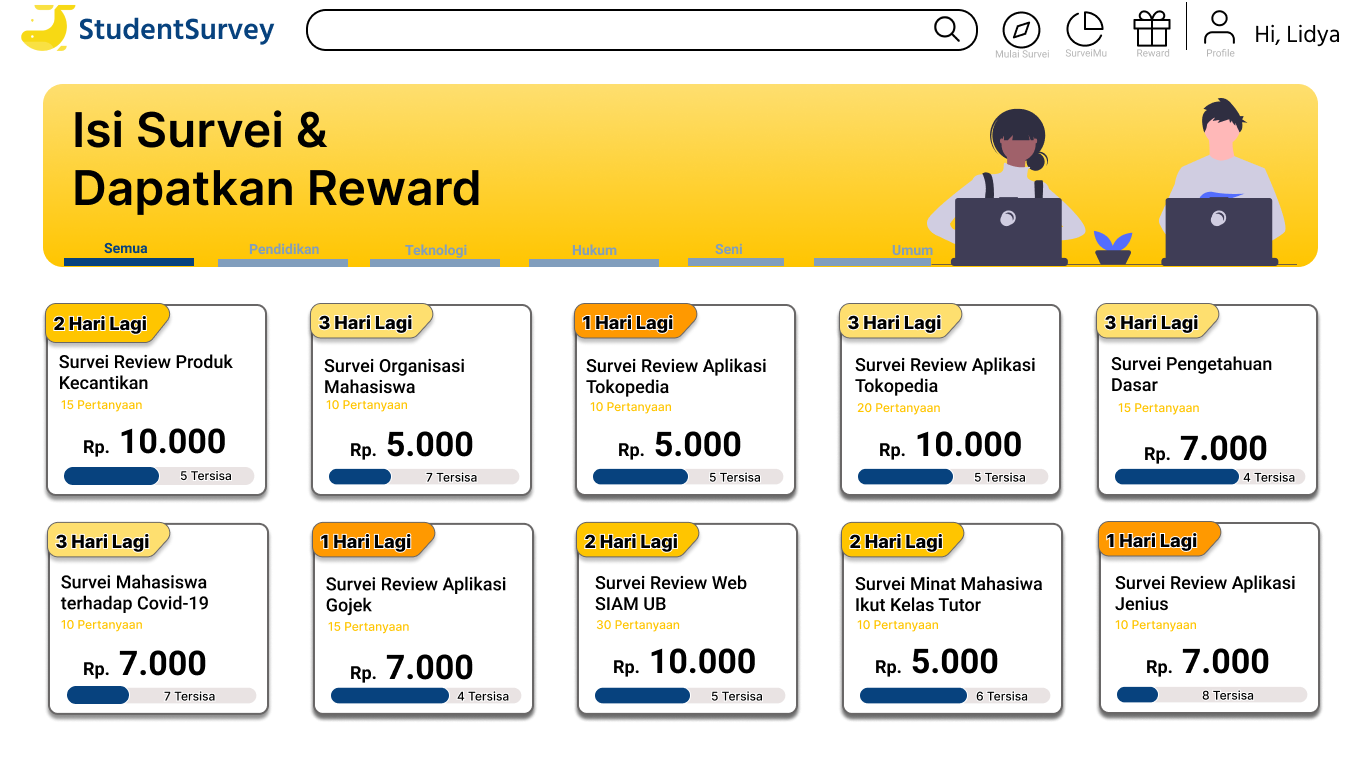
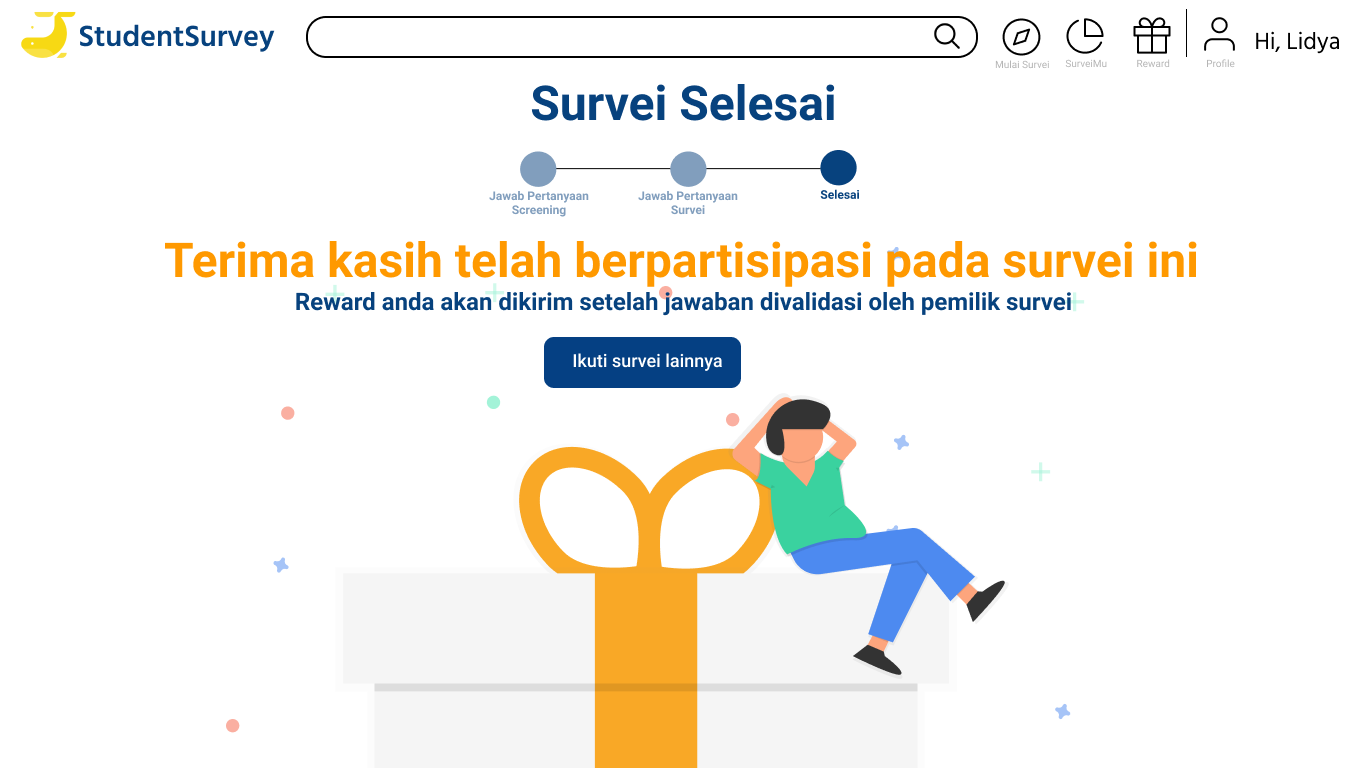
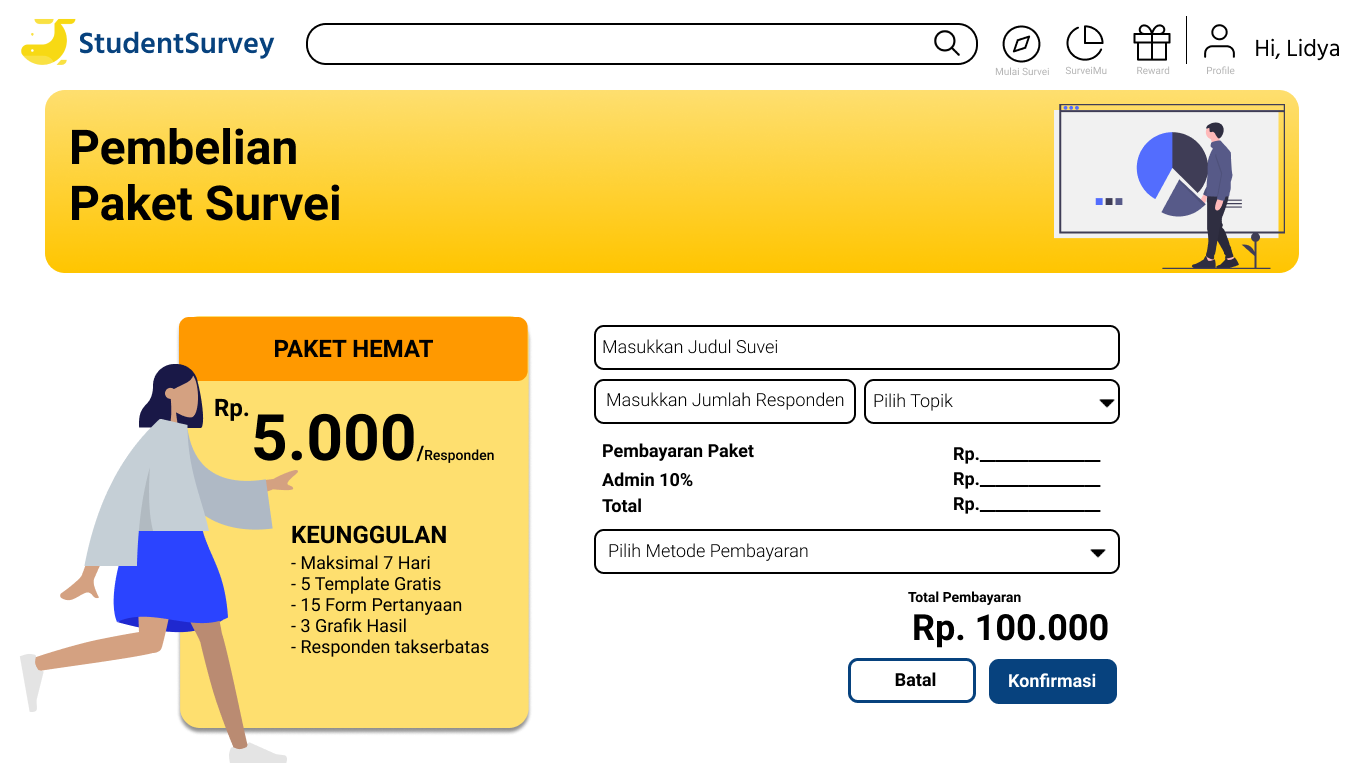
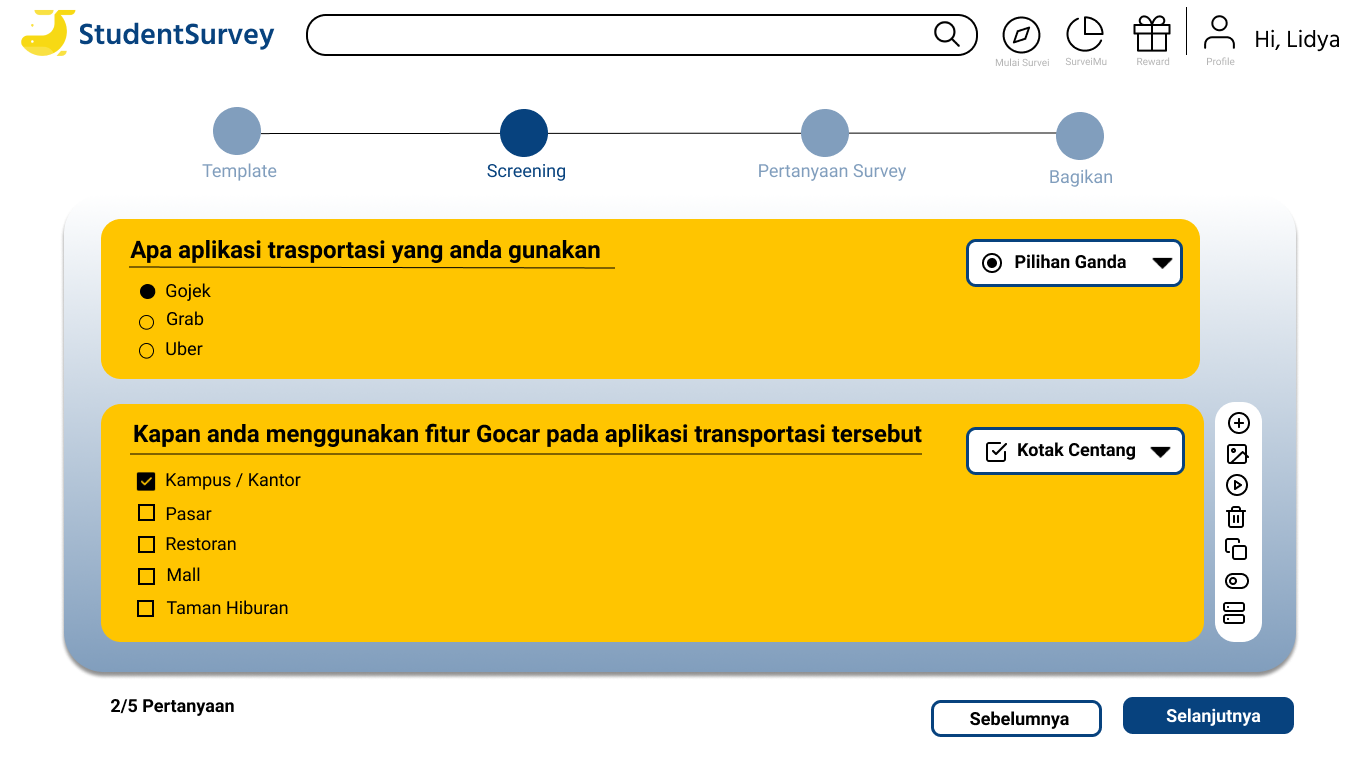
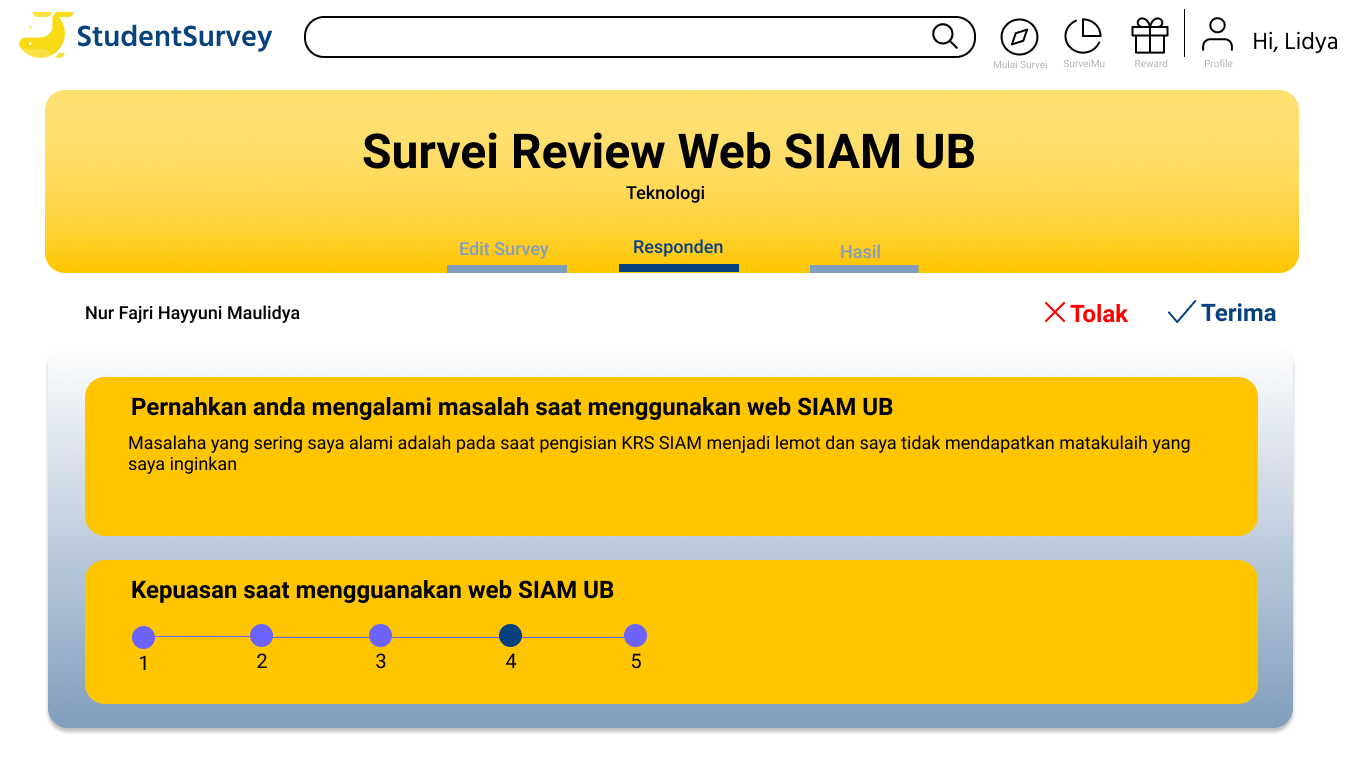
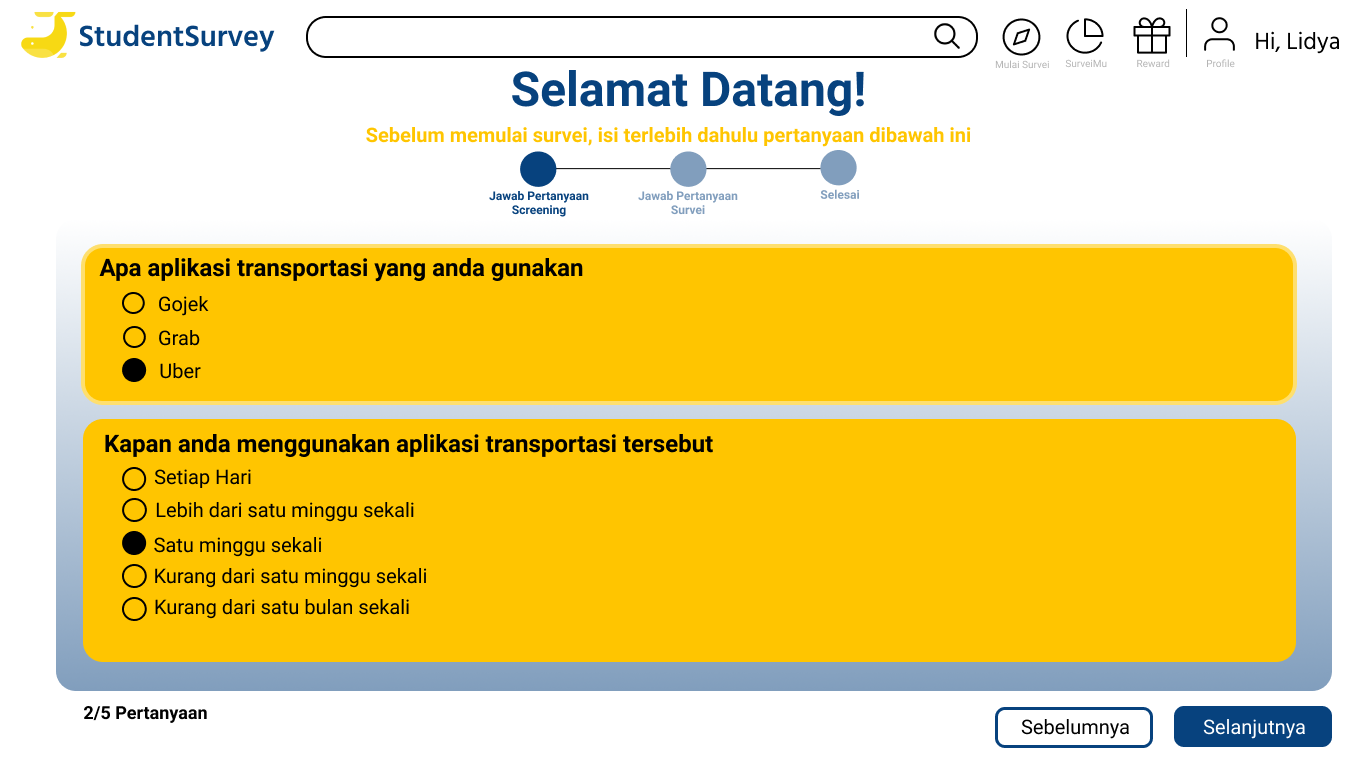
Finally, we made hifidelity which was made into a prototype. making hifidelity in accordance with wireframe using UI components that have been described









Previous
Next
Check our
DEMO video
OUR TEAM

Nur Fajri Hayyuni M
UX Designer

Galuh Fadillah Grandis
UX Researcher

Kresentia Verena Septiana Toy
UX Designer

Yufita Berliana Putri
Programmer
Copyright © 2020 Student Survey with ❤️ . All Rights Reserved