DESIGN PROCESS
2. Modeling the solution
User Journey
User journey is a visualization and interaction of users with products or services that are designed. We use one persona from Aditya Luthfi A.
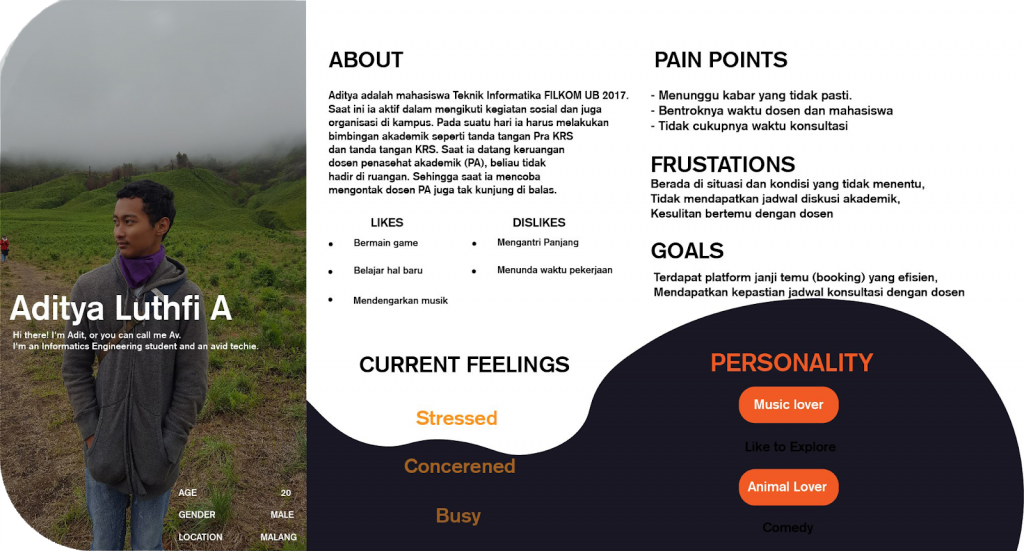
Based on Aditya’s experience regarding academic guidance at FILKOM UB, we found the journey map points outlined as follows:
- Research and consider the schedule of lectures with appointments with lecturers
- Choosing an appointment with a lecturer
- Booking appointment schedules with lecturers
- Use notification reminders before starting appointments with lecturers
In more detail, we arrange the journey map in tabular form as follows :
Phase
Research and Consider
Looking for a Schedule
Booking Schedule
Use
Action
-Ask the lecturer
-Ask a friend
-See the lecturer attendance schedule on the website
-Choose the available schedule and contact the lecturer to ask the lecturer schedule
-Online booking
-Fill out the schedule meeting needs
-Detailed schedule meeting needs
-Get schedule information for appointments with lecturers
Positive
-The duration of lecturer appointments is quite long
-The schedule between students and lecturers does not collide
-Can fill lecturers appointments according to calendar
-Can discuss with lecturers well and smoothly
Negative
-The presence of lecturers is difficult to ascertain
-Too long to wait or waiting in the line for appointment
-Schedule between students and lecturers that collide with each other
-UX experience that is not intuitive when filling in the booking details with the lecturer
-Worried if the lecturer is not present on time as scheduled
-Worried if the lecturer suddenly cancel the appointment
Channel
-Whatsapp
-Telegram
-Email
-LINE
-Text Message
-Face to face
-Whatsapp
-Telegram
-Email
-LINE
-Text Message
-Face to face
-youcanbookme.me
(or similar application)
-Website
-Application
-Whatsapp
-Telegram
-Email
-LINE
-Text Message
-Face to face
Recommendation
-Platform that can display lecturer appointment schedules
-Platform that can display the activeness of lecturers when providing guidance to students
-Mentioning the availability schedule of lecturer appointments
-Displays the presents or not presents status
-Lecturer filters are available based on specialization or majors
-Can provide a sense of comfort and trust between students and lecturers
-Can provide constant certainty in accordance with the appointment schedule
-Provides a FAQ page on the platform related to students needs
-Keep connecting communication between lecturers and students to get feedback
User Flow
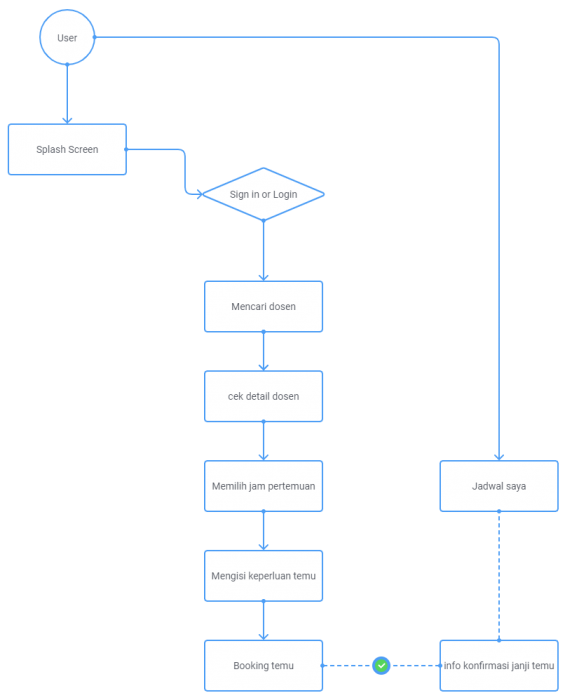
User Flow is a step that taken by the user to achieve goals when using a product or service. We describe the flow of interaction from the perspective of users on each platform that will later be built to the team (developers, UI/UX designers, and product managers) and stakeholders. Its function is so that our team and stakeholders can understand the logic behind user interaction in different scenarios. In the model below there is a User Flow image of each feature provided in the application.
Information Architecture (IA)
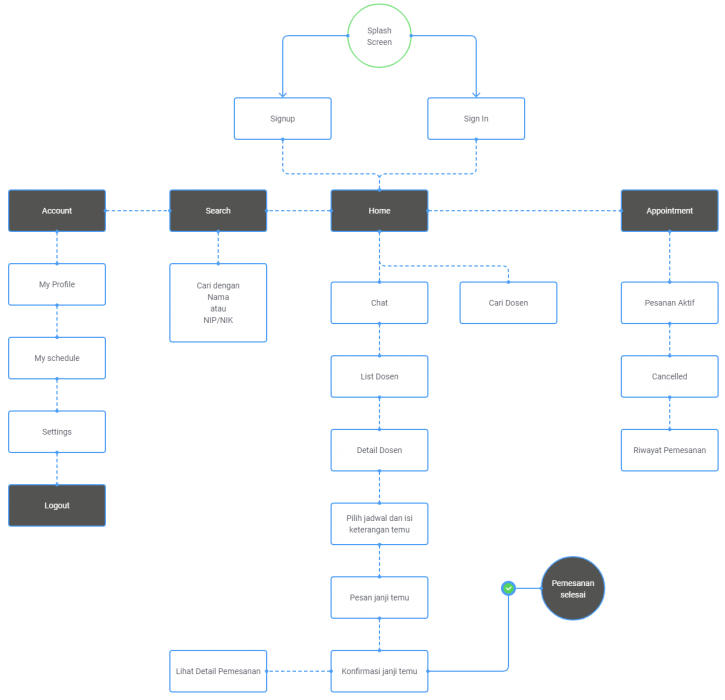
Information Architecture (IA) is a model of information structure in applications that is designed so that the information that will be conveyed in the application can be easily understood by the team (developers, UI/UX designers, and product managers) and stakeholders. In the model below there are Information Architecture images on each feature provided in the application.
Mental Model
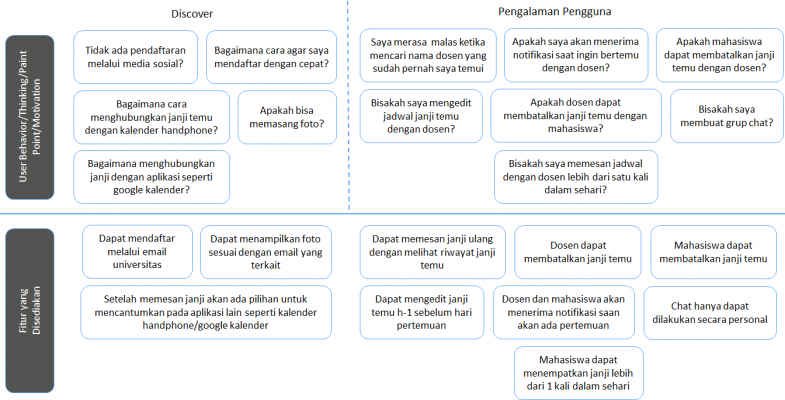
Mental Model is a picture of the user’s feelings or thoughts when using the application products and features provided by the team (developers, UI / UX designers, and product managers). The following is the Mental Model of the application that we will build.
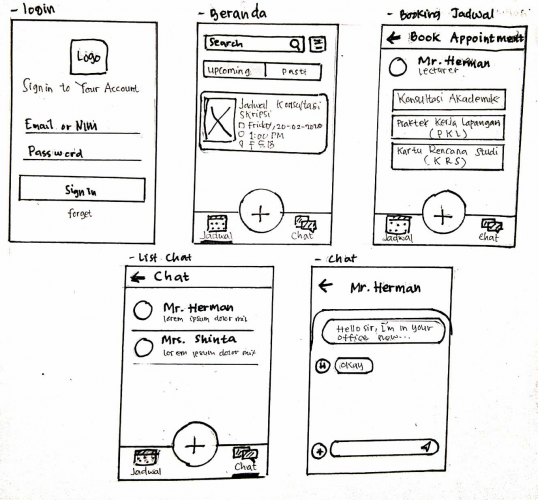
Sketch
Sketch is the result of a product interface design description of a predetermined idea in order to see the rough shape of the product to be implemented. This sketch is included in Low Fidelity because it is only described simply to map the basic layout of the product, making it easy to make and fix on paper directly. The following are the results of the sketch we made regarding the application for ordering lecturers’ appointments.
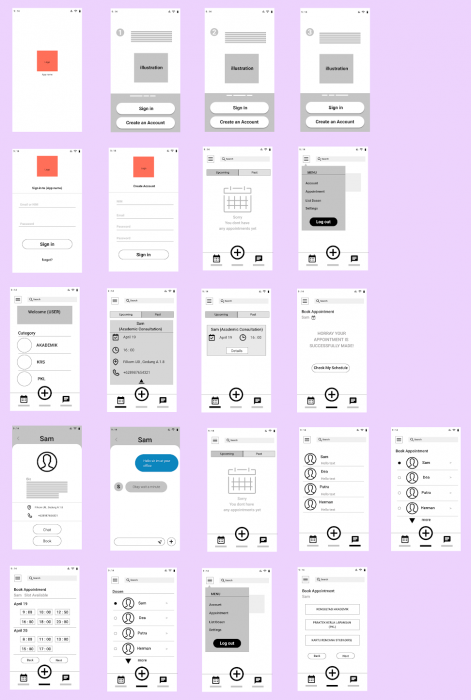
Wireframe
Wireframe is the basic framework of the product that contains the composition, structure, layout, navigation, and organizing content which is continued after making a sketch.
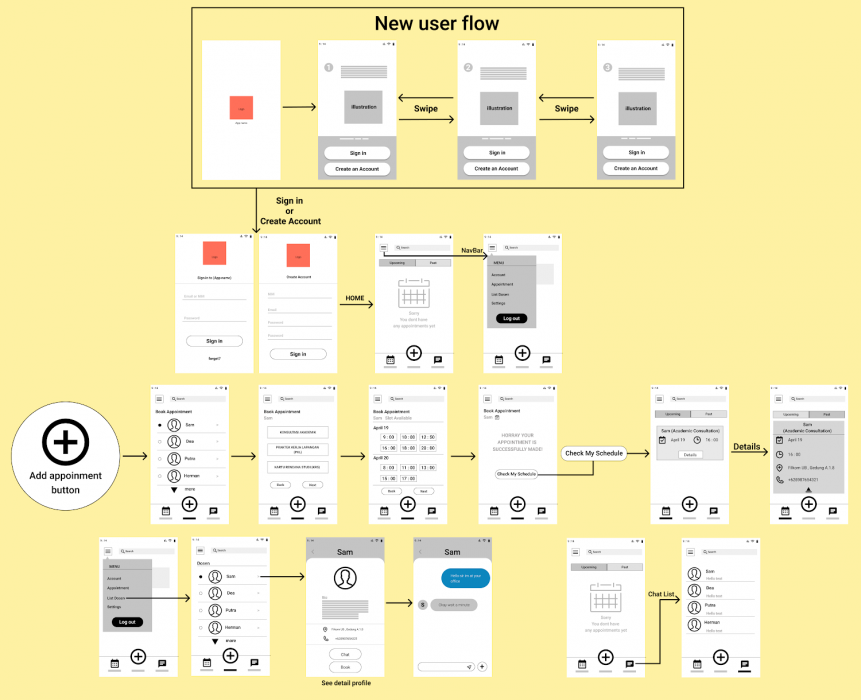
Screenflow
Screenflow is the result of the depiction of the system flow in each layout view to find out the stages of the system to achieve the final goal to complete a job. The following is a screenflow that we made related to the lecture appointment booking application.
< Problems & Finding Needs
Home
Product Testing >
© 2020 MeeD. Built using WordPress